 Tugamars
Advanced Whiteboards
Boards players draw on, pin images and links to, and edit together live, placed in-game by staff.
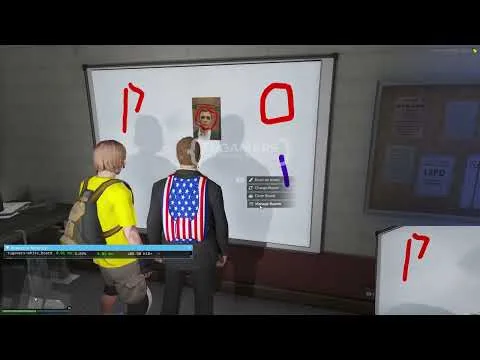
Tugamars' Advanced Whiteboards puts boards on a FiveM server that players can actually draw on. They sit on a custom stand in briefing rooms, classrooms or offices, and anything added to a board appears for everyone nearby as it happens.
How it plays
A player walks up to a board and opens it. They sketch by hand, add as many pictures as they like, or place a direct link on it. The player who made a drawing can hand editing rights to others, and every change shows up live for anyone looking at the board. When the server restarts the boards are cleared, but drawings that were saved return.
For server owners
- Place boards with an in-game placer, no coordinate typing required.
- Put up to 10 boards in a single room.
- Set a timer for how long drawings remain before they are wiped.
- Receive uploaded board images through a Discord webhook you choose.
Before you install
- Runs standalone, so ESX and QBCore servers work too; it identifies players by license and places boards via a command
- QBCore item use: the hook ships, yet this build does not fetch QBCore's core object. Add the one missing line to
main/server/framework.lua(the source is open) and the item works - Notifications rely on t-notify, missing from the manifest's dependencies: install it, or edit both notify functions inside
config.luato call your own - ox_lib and PolyZone
- ox_target or qb-target for interaction; the hook is exposed, so another target resource can be connected
- Images added to boards upload to a Discord webhook the owner configures
- Sold as build 1.1.2, with every file open. Version 1.1.3 from Tugamars, which lets boards show web pages, is newer and is not what you get here
Also by Tugamars
Tugamars mostly builds police equipment and working set pieces; the Tugamars studio page covers the studio.
Write a review
Reviews are moderated before appearing. Purchased the product? Your review gets a VERIFIED badge automatically.
Included with this resource
- Whiteboard resource with a drawing interface
- Custom whiteboard stand prop
- A placement command for positioning boards in-game
- Detailed config file
- Drawings saved in the resource's own storage, no SQL database needed

 Pug
 AK4Y
 CodeM
 Kevin Scripts

 VMS