 Scully
 Radio v2
An on-screen handset for voice channels that shows every member's name and callsign and who is speaking.
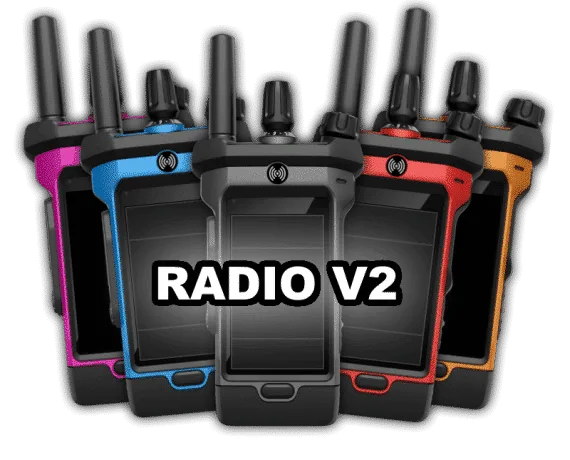
Scully's Radio v2 puts a handheld set on screen for FiveM voice channels. Players join a channel, choose the name and callsign others will see, and can tell at a glance who is talking. It earns its place wherever departments or crews run their comms by voice.
How it plays
A player pulls up the radio and drags it wherever it suits them on screen. They can turn it off, adjust the volume and switch between light and dark themes. One screen joins a channel and another sets which name and callsign appear. The framework fills in the callsign on QBCore and on Scully's Server Core; on a standalone server players type both. With the optional member list on, everyone in the channel is listed, each name lights up as that person speaks, the player can include themselves, and a command hides or shows the list.
On a multicharacter server, switching away from a character also removes that player from the radio.
For server owners
- Whitelist channels and give them custom names.
- Decide whether mic clicks are heard.
- Offer the radio in 14 colours, and optionally let players change colour by item or command, with the choice remembered.
- Set a unique identifier so names saved on other servers do not carry over to yours.
- Notifications come from the framework itself on ESX, QBCore and Server Core.
Before you install
- ESX: supported, radio item optional
- QBCore: supported, radio item optional
- Server Core, Scully's own framework
- Standalone, names and callsigns typed in by players
- Voice: pma-voice only
- Qbox is not named on the studio's listing
Also by Scully
Staff who also want a menu can look at the All In One Menu, or see what else Scully makes.
Write a review
Reviews are moderated before appearing. Purchased the product? Your review gets a VERIFIED badge automatically.
Included with this resource
- Radio resource plus a config switching each optional feature
- Inventory icons for each of the radio colours
- Guide to the radio's buttons
- Readme with ACE permission notes
- An export so other scripts can read a player's radio name
 VMS

 Kevin Scripts
 CodeM
 Tugamars


 Pug

 AK4Y